INDUSTRY:
Healthtech
YEAR:
2025
ROLE:
UX/UI Design, User Research
TIMELINE:
5 Weeks, Part-time, Team Project

Life after cancer treatment is a strange in-between space. Survivors often describe it as stepping out of a storm only to realize no one handed them a map for what comes next. This project began with a simple question that deserved a serious answer: How do you design for life after cancer, the part where treatment is over, but uncertainty, isolation, and emotional weight remain?
This UX/UI project focused on supporting cancer survivors with the emotional, social, and mental health challenges that arise post-treatment. Many survivors feel isolated and overwhelmed once the medical system stops checking in, which creates a painful lack of continuity in care.
I contributed across all stages of the project, from initial research to final hi-fi prototype presentation, and took the lead on UX research, user interviews, and usability testing. I supported the team through concept development, user flows, and prototyping while keeping the experience grounded in empathy and evidence. My focus was on creating a safe, compassionate, and empowering solution for survivors.
challenge
Survivors face a steep emotional drop once treatment ends. They often lose access to structured support, frequent check-ins, and a sense of belonging that came from the treatment community.
Early survey responses revealed how deep the emotional need is:
Many survivors reported feeling unsupported, confused, or “left hanging” after treatment.
Several said they didn’t want to burden family or friends with their worries they might not relate to.
A few tried joining support groups but left quickly because the space didn’t feel like theirs.
The user interviews gave an even clearer picture. One memorable quote from a participant summed up the emotional reality:
“My family wants to take it all over for me, but they can’t. […] The other girls [WhatsApp group] understand. When you have to get another infusion or another operation, they know exactly what it feels like.”
From these insights, the central challenge appeared:
How might we create an inclusive, safe space that helps survivors navigate life after treatment with emotional grounding, community, and reliable support?
Survivors needed gentle guidance. They needed people who understood. They needed tools to track their emotional world without feeling overwhelmed, and they needed it delivered in a way that felt calm and empowering rather than clinical.


Solution
Our solution grew directly from survivor insights. Through secondary research, surveys, and interviews, four needs surfaced again and again: continuous emotional support, community with people who share similar lived experiences, flexibility for different coping styles, and an environment built on trust and emotional safety.
This insight helped us frame our problem statement:
Cancer survivors need a way to connect with others who have shared their experience, because traditional support systems often fail to address the emotional and social challenges of life after treatment
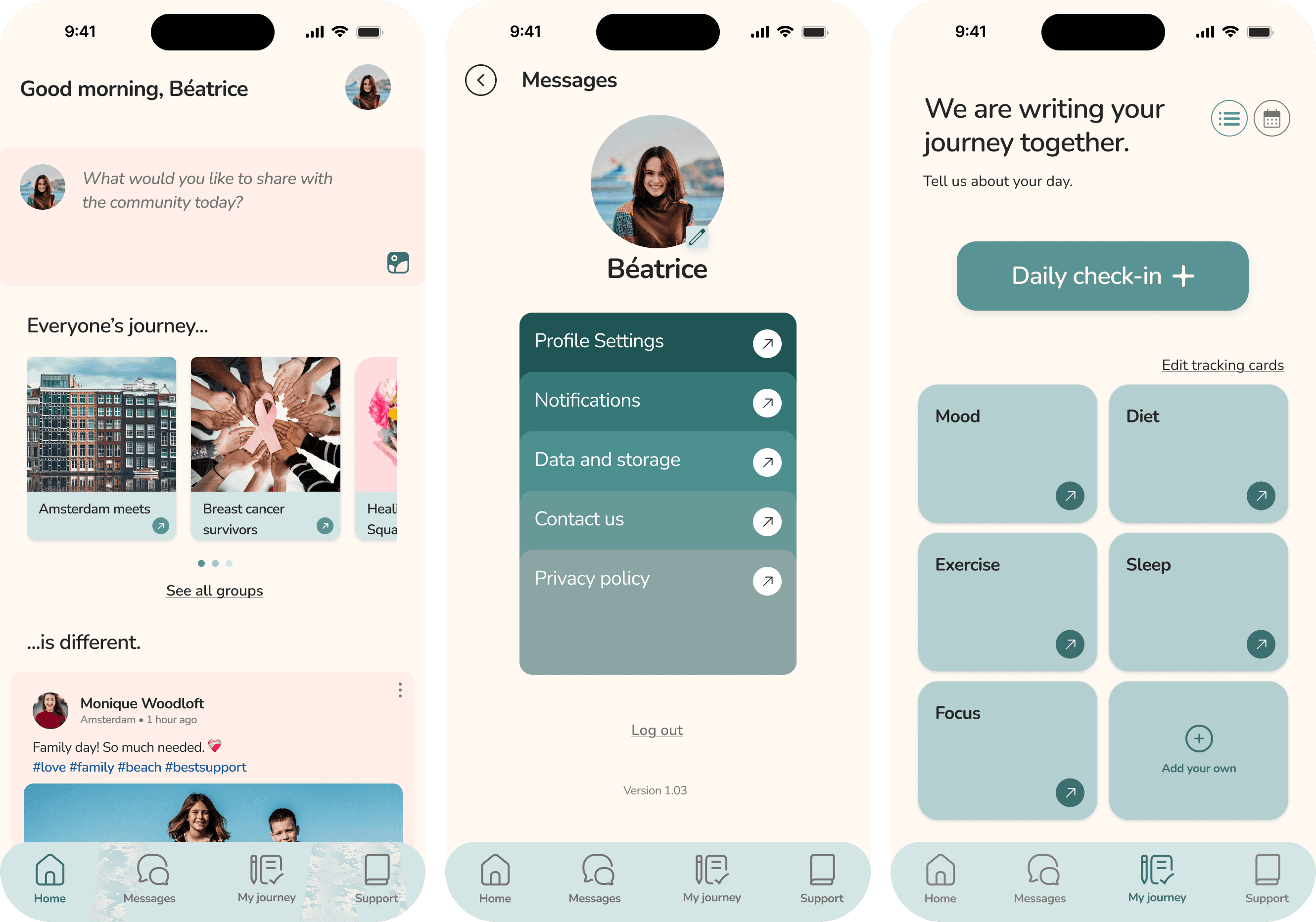
To ground the experience, we created the user persona Beatrice and mapped her emotional journey. This helped us prioritize features like gentle onboarding, identity-based support groups, private messaging, and a personal reflection space. With the help of the MoSCoW method, we focused on tools that offered guidance without overwhelming the user. The information architecture stayed intentionally simple with five core sections to reduce cognitive load.
We tested low-and mid-fi prototypes with survivors to understand how they interacted with the product. Feedback led to clearer onboarding, friendlier mood-tracking copy, and more intuitive page structures. The visual identity leaned into calm and inclusive tones to create a sense of grounding. The final concept offers a supportive space where survivors can connect, reflect, and navigate post-treatment life at their own pace.